
User guide · Community Edition
Community Edition in your browser
Versatile AI Risk Assessment guides you through a structured risk assessment of an AI system, from threats and the EU AI Act to GDPR and DPIA. Community Edition is the free edition for lasting, local, non-commercial work. It runs entirely in your browser, with no account and no data transfer. The website opens it with a completed learning example. This guide explains every function step by step.
Application version v3.27.1 and example-project version v1.5 refer to different things. Screenshots show fictional learning data; answered questions and modelled controls do not establish legal compliance.
- 6steps per assessment
- 52AI threats in the catalogue
- Project file
.vra-project.jsonfor backup and device changes - 0accounts, servers or telemetry
What Community Edition includes
The website demo opens a fully populated, fictional assessment of an autonomous invoice and payment agent. Downloads and the browser versions without an example start empty. Both additive scoring and the 3×3 risk matrix are available from the Community Edition page. Working states belong to the selected risk model; choose the matching model when restoring a project.
Included in Community Edition
- Capture one AI system and document its context in a structured way.
- Review system-type-based threat selection, assess risks and classify the system under the EU AI Act and GDPR/DPIA.
- Generate PDF reports and save or restore the complete working state as a versioned
.vra-project.jsonproject file.
Deliberate edition limits
- No account, user roles or tenants: one local workplace.
- No data transfer, cloud service or telemetry.
- No portfolio and no general-purpose JSON, CSV, XLSX, DOCX or integration exports.
- Not a substitute for legal or specialist advice (see notes).
Getting started
- Start Select “Start live demo”. The guide opens the website and starts Community Edition there in the same full-screen view used on the website. “Show website” or “Close” returns you to the website at any time; your browser’s Back function returns you to this guide. The same flow works entirely locally in the offline version. Nothing is installed or transferred.
- Download Choose a model on the Community Edition page, download the ZIP, verify its SHA-256 checksum and extract it. Open
index.htmlin a current browser; keep the accompanying licence and release documents. - Usage notice On first launch, a notice explains local, non-commercial use, local auto-save and Community-labelled reports. Select “Accept license terms and start Community Edition” to continue.
- Guided tour An optional tour takes you through the complete workflow in about five minutes. It is offered when the demo first starts and can be closed with Esc.
- Language Use the “EN” control in the top right to switch between German and English. The interface and reports follow your selection.
- Display The sun or moon button switches between light and dark mode. Language and display settings are remembered for the next launch.
No connection required. The application works entirely offline. It loads no remote content and sends no data.
Create a new assessment
Each assessment receives a permanent assessment ID, independent of its title and document version. Starting a new analysis creates a new ID.
Community Edition keeps exactly one current browser project. Creating a new assessment therefore replaces the current working state. Follow these steps:
- Open Step 1 Go to “System information” and find “State & Versioning”.
- Select “New Analysis” The application first offers to preserve the current project. “Export and continue” is recommended; you can also consciously continue without an export or cancel.
- Choose the catalogue Decide whether to load the default catalogue of 52 threats or keep the currently loaded catalogue.
- Describe the new system The application resets project, assessment, comparison, EU AI Act, GDPR and FRIA data, returns to document version v1.0 and opens Step 1 for your new details. Changes are saved locally and automatically.
Back up first. Only an exported project file can be imported later. A PDF report is a reading document, not a restorable backup.
The six-step workflow
An assessment has six steps. The step bar at the top shows your progress, and you can move between the steps using the step bar. Evaluation requires confirmation of the threat-selection review first.
| Step | Content | Outcome |
|---|---|---|
| 1 System information | Core data about the AI system | Context for every later step |
| 2 Threats | Relevance and assessment for each threat | Inherent and residual risk |
| 3 Evaluation | Dashboard, risk matrices and export | Overall picture and reports |
| 4 Comparison | Current state compared with a baseline | Changes for each threat |
| 5 EU AI Act | Classification and obligations | EU AI Act risk class and obligation list |
| 6 GDPR | Data protection and DPIA requirement | WP248 score and DPIA assessment |
System information
Describe the AI system here: system name, description, system type, deployment phase, user group, owners, application and GRC references, plus certifications and assurance evidence. In addition to ISO/IEC 27001 and ISO/IEC 42001, you can record ISO/IEC 27701:2025 and ISA/IEC 62443. The associated information buttons explain which scope, certificate, issuer and validity details should be verified before selecting an item. These details provide context for every later step and report.
Changes are applied immediately and saved automatically in local browser storage. The selected system types allow the application to identify suitable threat profiles for step 2. The resulting selection remains transparent: recommended, optional and hidden threats can be reviewed and overridden before assessment. Open “Review selection” and confirm that you have reviewed recommended, optional and hidden threats before continuing to evaluation.

Threat analysis
The catalogue covers 52 AI threats across supply chain, development and production, with mappings including OWASP LLM, NIST AI RMF, MITRE ATLAS, BIML ARA and ISO. Mark each threat as relevant or not relevant and assess every relevant threat by likelihood, exploitability and protection needs, both inherent and residual, including a rationale and planned controls with owners and due dates. Details for recommended controls now also identify the control type, effect and implementation level.
How the score is calculated
In the additive model, the risk score is likelihood + exploitability + protection needs (0–11). Assess the inherent and residual risk separately. The levels are:
- Low 0 to 5
- Medium 6 to 8
- High 9 to 10
- Critical 11 or higher
You can add up to five custom threats. They remain stored locally in the project and are included in the Community project file; they do not form a reusable global catalogue.

Evaluation
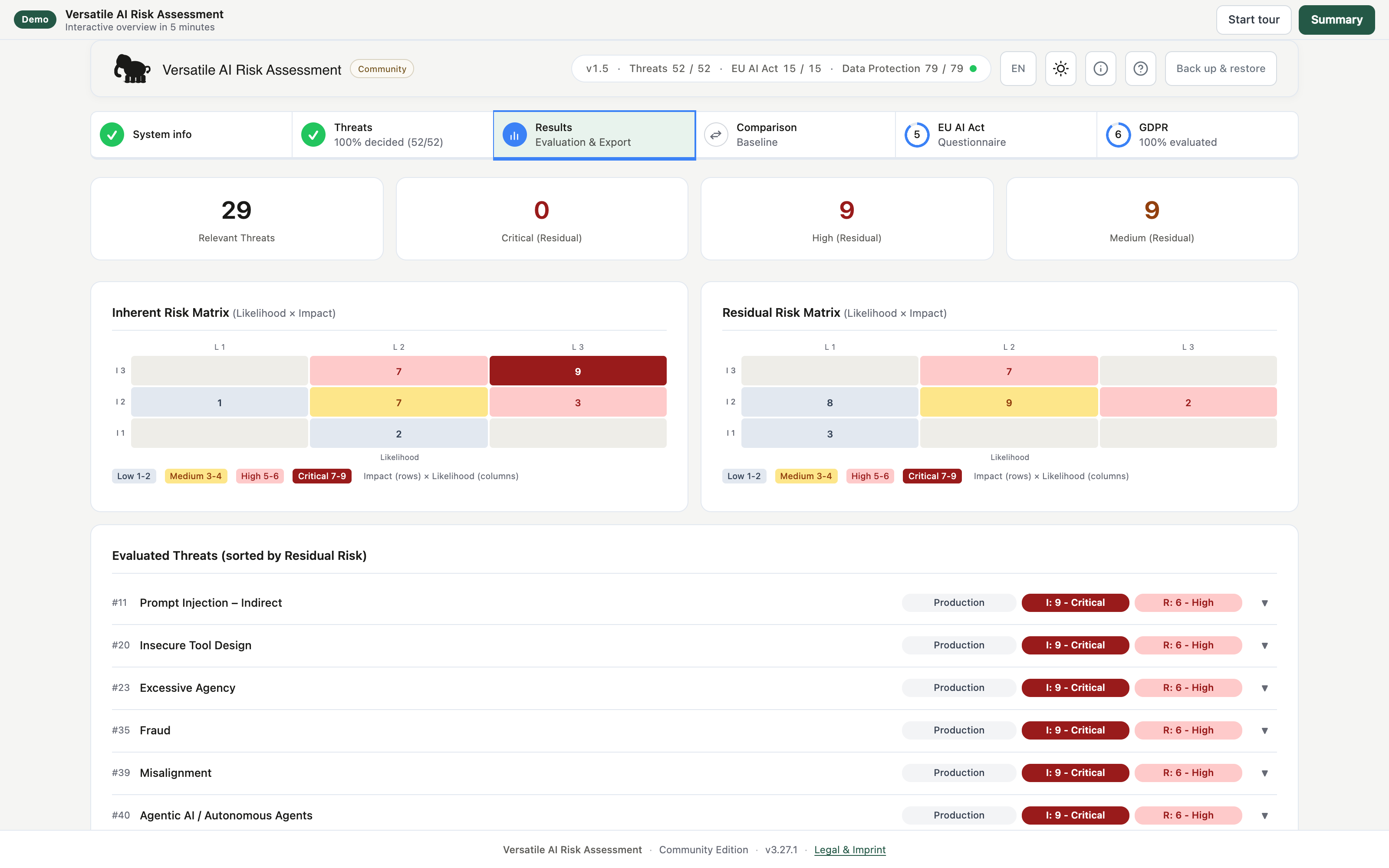
The dashboard summarises the assessment with metrics for each residual-risk level, two heat-map risk matrices for inherent and residual risk, and a threat table sorted by residual risk with inherent (I) and residual (R) values. You also generate the PDF reports from this step.

Version comparison
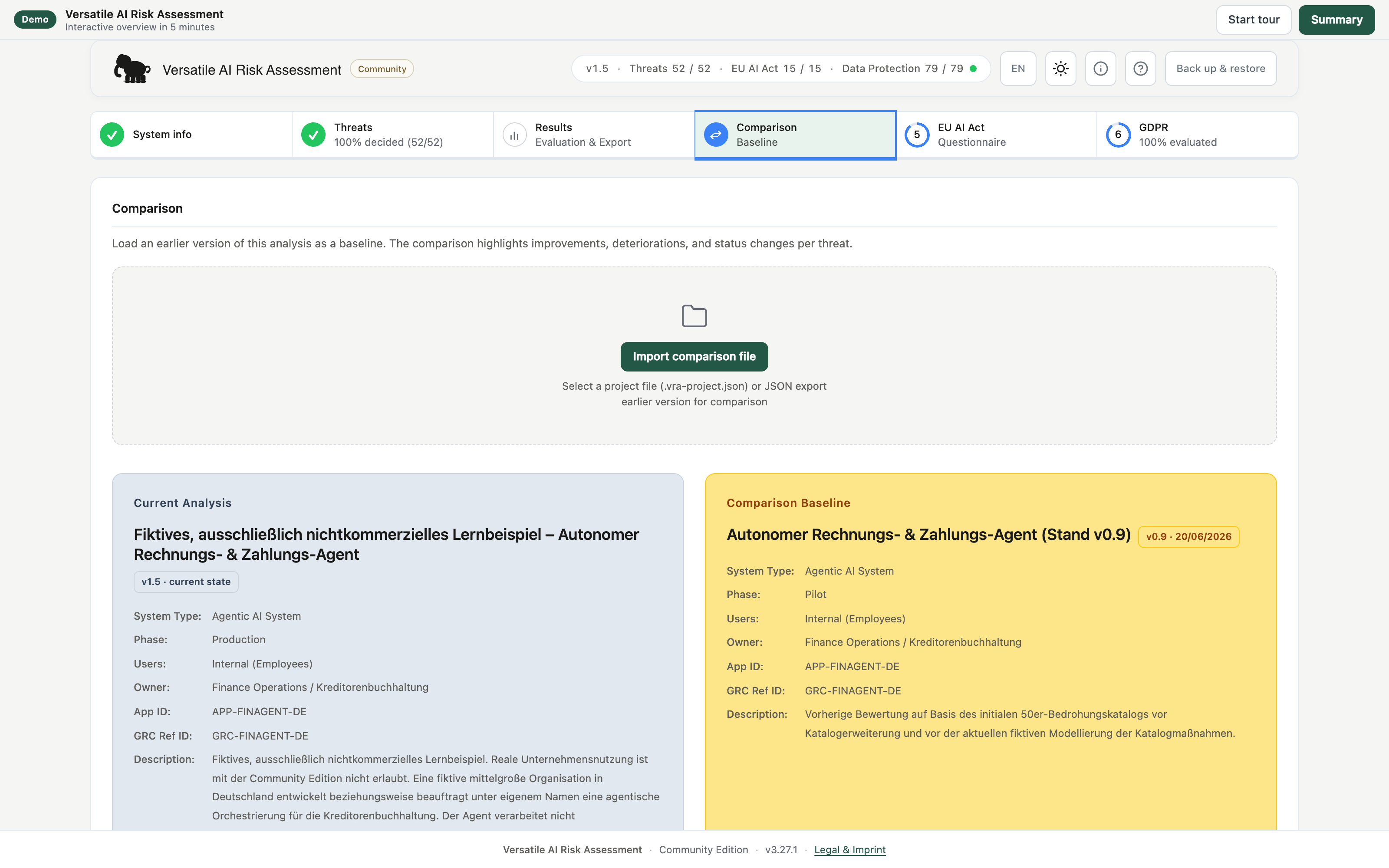
Compare the current learning assessment with its prepared v0.9 baseline to make changes after implemented
controls visible. For each threat, the application shows whether the result improved, worsened, stayed the
same, was added or was removed, together with the as-of date; filters and search support the review. The result can be generated as a
Community-labelled comparison report in PDF format. The catalog fingerprint in the PDF identifies the catalogue used. For your own comparisons, load a previously saved
.vra-project.json project file as the baseline in step 4. The file must be compatible with the
current risk model. Comparing identical saved states shows no substantive changes. Spreadsheet exports are not included in Community Edition.
EU AI Act
A guided questionnaire identifies the system’s EU AI Act risk class, including the product-law context and the assessment date. The application then shows the associated obligations, their evidence and a regulatory timeline.
Classification and obligations
- The questionnaire covers scope, role, high-risk status, transparency and GPAI, and derives the resulting class.
- An obligation checklist for the class includes AI literacy under Article 4 and a progress indicator.
- A regulatory calendar maps obligations to deadlines and their legal status.
- The catalogue reflects Regulation (EU) 2026/1744, published on 24 July 2026 and in force since 27 July 2026, including its staged transitional deadlines.
- The Community EU AI Act report is generated locally as a labelled PDF. Annex IV / OSCAL and mapping exports for EAM systems are part of the commercial editions.

GDPR / DPIA
A questionnaire in ten sections assesses data protection and whether a data protection impact assessment (DPIA) is required, covering scope, legal basis, data-subject rights and evidence, with conditional follow-up questions.
Guidance, rationales and required evidence rest on the reviewed GDPR/EDPB evidence basis, are derived from the documented answers for the specific processing context and require professional review.
WP248 and mandatory lists
The application evaluates the WP248 criteria and tests the DPIA requirement under Article 35(3) as well as the mandatory lists issued by supervisory authorities under Article 35(4). The result is a traceable classification with a rationale. The GDPR PDF includes directly answered and derived WP248 criteria, with the originating questions for derived criteria. Its progress indicator uses the same answered and visible questions as the application.

Reports and project file
PDF export is enabled in Community Edition. Threat and risk analysis, EU AI Act and GDPR reports are
generated locally in your browser and carry the Community watermark. Step 1 also exports the complete
working state as a versioned .vra-project.json project file. It is intended for your own
backups, restoration and device changes and is checked for format, schema, integrity and compatibility before import.
A project file is not a general-purpose JSON export. General or combined JSON exports, CSV, XLSX, LeanIX, Word, Annex IV, evidence bundles, mapping profiles and assessment packages remain reserved for Professional and Enterprise. See the edition overview for a comparison.
Saving and edition limits
Your changes are saved automatically in the browser’s IndexedDB database. Language and display preferences are stored separately. There is no server that receives or knows the data. Browser storage is not a permanent backup, however: the local working state may be lost if website data is cleared or you change browser profile or device.
Separate workspaces and upgrading to v3.27.1
The additive model, 3×3 matrix and three individual modules separate their working data by risk model and feature set. The 3×3 demo has its own workspace. The additive demo and full additive browser edition still use the same workspace. The empty 3×3 edition and the three individual modules can be opened alongside an additive edition. The two website demos and the full additive edition share a writer lock; open these one at a time.
If you use the previous empty 3×3 browser edition, export your project file and a raw backup before the website update. After the update, reopen the 3×3 edition and import the project file following the compatibility check. An initially empty workspace does not mean that previous browser data was deleted. Do not clear website data until you have verified restoration.
Automatic local saving
Use “Backup & Restore” in the header to reach the backup controls. “Project backup” in Step 1 shows the last local save, the last project-file export, the schema version and the project version. “Export project file” creates a structured project file of up to 5 MiB. “Import project file” first shows a compatibility check; only your confirmation replaces the local working state. You can optionally export the existing state before replacement.
If the browser no longer has enough local storage, a warning remains visible. The application retains unsaved input for another save attempt and “Manage storage” opens an overview of local usage. Do not close the tab in this state until “Save now” has confirmed success.
Backup & Restore
The header dialog guides restoration of the single working state. Validation alone does not change data.
- First download the current raw backup using the first step in the dialog.
- Select that exact downloaded backup again for verification.
- Select the backup or working file to restore. Review the assessment selection, preview and any partial-recovery notices.
- Confirm the verified backup and preview only when you want to replace the current working state.
- After the workspace has been saved successfully, click Reload application. Then review the restored content; the previous session remains locked until reload.
Backup files contain confidential data and are unencrypted. Store them securely. Supported file types are checked for compatibility; selecting a file does not authorise its import. A Community project file is a portable partial snapshot; missing history or evidence is not reconstructed. Use the backup dialog to create a complete raw backup.
Import limits
Compatible Community project files only. The import file must not exceed 5 MiB
(5,242,880 bytes) and must contain valid project data. New exports use schema 2.1.0 and contain a permanent assessment ID. Older Community project files with schema 1.1.0, 1.2.0, 1.3.0 or 2.0.0 are checked and migrated during restoration. Project files using schema 2.1.0 can only be opened in application versions that support this schema. Keep a backup before upgrading. The regular filename
ends in .vra-project.json; browser-generated copies such as
…vra-project (1).json are accepted as well. General JSON files and unsupported format
versions are not imported. Before applying the file, the application also checks integrity, catalogue
references and the risk model. A confirmed import replaces the currently open browser project, so
export it first using the offered backup.
Difference from commercial editions
Community Edition includes the local core workflow, PDF reports, system-type-based threat selection, up to five project-specific custom threats and the Community project file. Permitted uses are personal non-commercial use and non-commercial education, research and nonprofit work. Business, consulting, customer-facing or other commercial use, as well as portfolios, full export formats and integrations, require an appropriate Professional or Enterprise licence.

Help, language and display
Use the icons in the top right to access help and settings. The help panel explains the quick start, terms and keyboard shortcuts directly in the application. The light/dark switch affects the complete interface; language and display settings are remembered for the next launch.
Data protection and data control
The edition transfers no data; everything remains in the browser on your device. Reports carry a Community watermark, and use is permitted only within the non-commercial scope. Do not enter real personal data, trade secrets or production customer data in the demo.
Using it responsibly
Not legal or specialist advice. The application is an orientation and structuring aid. It does not make a binding conformity determination and does not replace legal, privacy or subject-matter advice. Results must be reviewed and documented for the specific system.
Further information is included in the delivery package, including the EULA, data protection and storage notes, AI Act statement and provider information. The package also contains the manifest, checksums, SBOM, VEX, content assurance summary and third-party licences.
The package root contains index.html, favicon.svg, readme.txt and EULA.md. All evidence, including the manifest, checksums, SBOM, VEX and licence inventory, is in the nachweise/ subfolder. Extract the complete package.